
Role Based Administration
Before I show you how to add a user collection to a “role” in Configuration Manager, we need to understand some things about Role - Based administration.
First, this is not a detailed lecture covering Role Based Administration. In this lecture I will define Role based administration, and I will show you where the roles are located in the Configuration Manager console.
If you would like to explore Role Based Administration, check out the documents that I provided, you should be able to download these documents. I think you will find these documents extremely useful.
**Defining Role based Administration **
Role-based administration (RBA) provides Configuration Manager administrators with an easy way to implement the security model that allows them to assign and manage administrative permissions by assigning which actions they are able to perform using security roles, and which users and systems they can manage through collections , and which objects they can access using security scopes. Based on their administrative permissions, the Configuration Manager console has been significantly enhanced to provide administrators with a streamlined view that is customized to their specific role—showing only what they need to do their job.
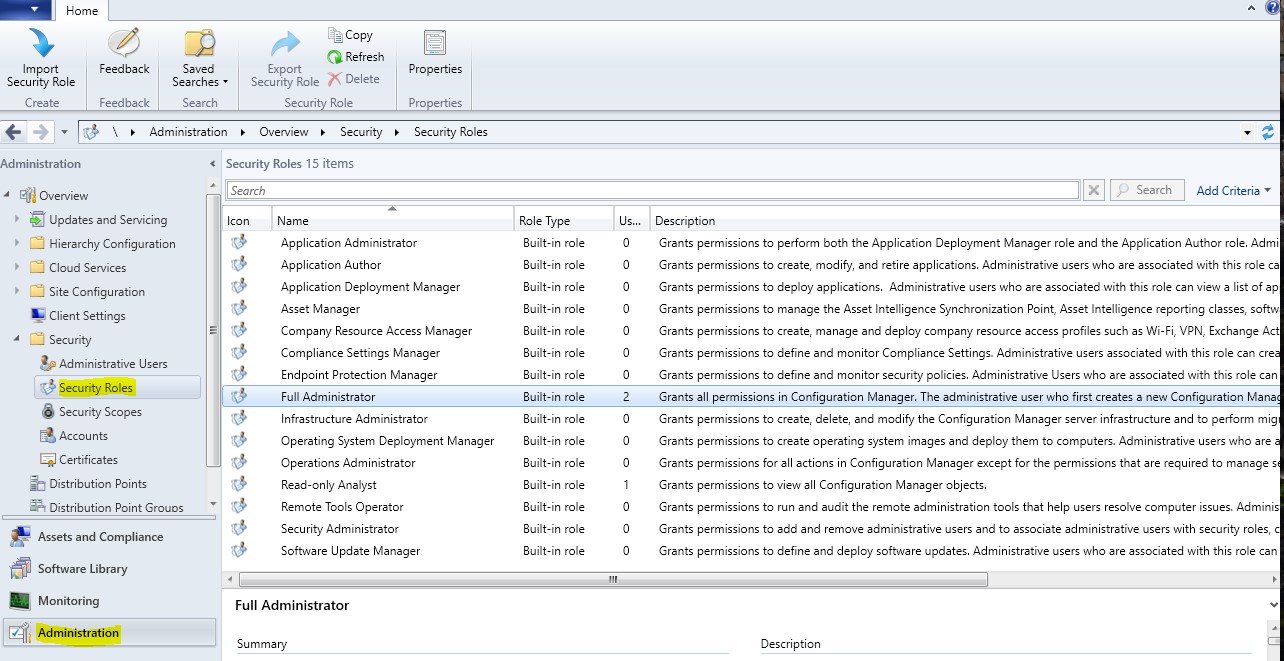
To access the built in security roles, open configuration manager, from the workspace, click Administration, from the Navigation Pane click Security, then click Security Roles. Displayed are the fifteen Security Roles. In another lecture we will assign a user collection to the Full Administrator security Role.
That’s enough for now, we’ll catch up with you in the next lecture.
No comments yet. Add the first comment to start the discussion.