
Query Based User Collections Example #1
In this lecture I’m going to show you how to create a query based user collection that will pull Users from a specific OU into a User Collection.
**Example #1 – Let’s say in your organization you have an OU (Organizational Unit) called Managers, the members of this OU often change as managers come and go. From SCCM you need a way to keep track of the Managers OU as changes are made. **
- First, we need to take a look at Active Directory
Login to your Domain Controller, Open Server Manager, click Tools, click Active Directory Users and Computers.
Here I need to create a organizational unit called managers.
So in this case I right click on ServerAcademy.com, (Your Active Directory may look different) click new and then choose Organizational Unit, for a name type Managers, then click ok.
Now right click on Managers and click New, then select User.
Here I type** Joe**, tab 2x and type Grey. Login name type JGrey , click next.
Type password 2x and for this lab click password never expires.
Click next, then click finish. Now create two more users, stop the video while you do this. After you have created all three users go ahead and close ADUC and Server Manager.
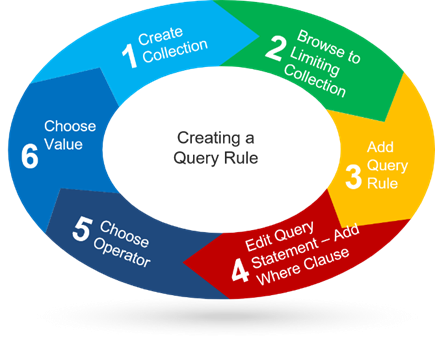
- **First let’s create a User Collection, **
- For Limiting Collection, click Browse, click All Users, click ok, then click next.
On the Membership Rules panel check the box Use incremental updates for this collection. Because the query based membership will change as members are added and removed from the Managers OU.
- Click Add Rule, click Query Rule, for a name type Managers ,
- Now click Edit Query Statement. Click Criteria, click the orange Icon.
For Criterion Properties , Criterion Type use the default (Simple Value)
For the Where clause, click select , for attribute class , choose (User Resource),** ** an…
No comments yet. Add the first comment to start the discussion.