
Configure Windows Firewall with Group Policy for SCCM
In this lecture, we are going to be creating a Group Policy Object that is going to configure the Windows Firewall of our SCCM clients.
Now this lecture is going to be completed from the Windows Domain Controller in our case SADC01.
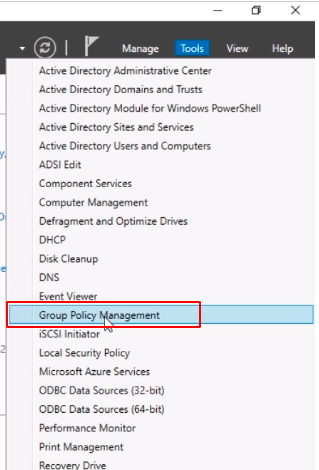
What I am going to do in Server Manager is click Tools > Group Policy Management
Expand Forest which is my ServerAcademy.com, expand Domains, and ServerAcademy.com.
At this point we are going to decide what scope we are going to configure our SCCM clients.
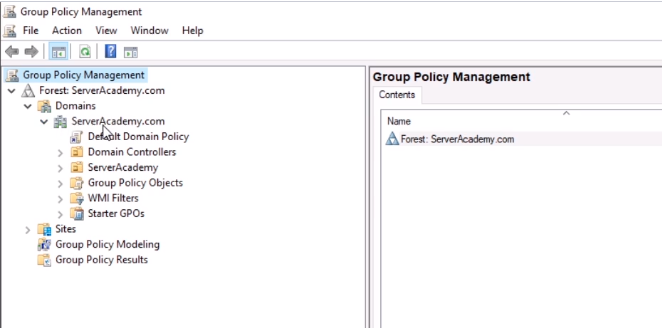
Now, if you have a special OU structure configured where you know you have all of your SCCM clients like maybe Workstations you could create the GPO and link it there.
One thing to keep in mind is that we are going to be opening ports on the firewall so if you want to be security conscious it might not be a bad idea to do some planning, and make sure we only link the GPO to OUs or domains where the computers actually need to have those firewall rules open.
But, what we are going to do for our lab environment is just create the GPO under the root of the Domain which means every computer inside of our domain will have the firewall rules enabled.
So, let’s go ahead and right-click on the root of the Domain ServerAcademy.com, and let’s select Create a GPO in this domain, and Link it here...
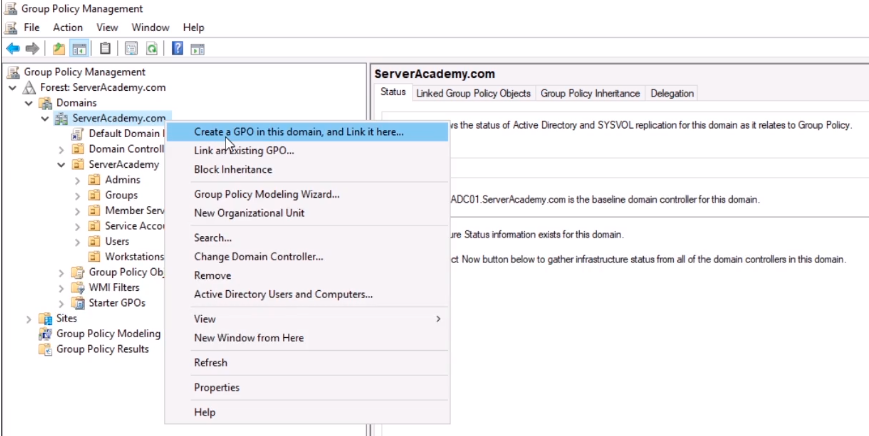
Next, we need to name the GPO. We can just call this something like SCCM Client Firewall, and you can name this whatever you want just make sure that is descriptive enough so that when you come back later and you look at it you see like for example this is configuring the firewall settings for your SCCM clients. Click OK.
No comments yet. Add the first comment to start the discussion.