
Problems using VB - AKM - Rajib
AKM had problems trying to join a Windows 10 VM to the Domain
AKM wrote
I am trying to join a Windows 10 computer to the domain, but I am getting the message "That the domain couldn't be found. Check the domain name and try again" but I was able to add the SCCM server to the domain.
I wrote,
Before you can join the computer to the domain you need to give that windows 10 machine an appropriate IP address. From a DOS prompt, you should be able to ping the ITFDC01 domain controller from the windows 10 computer.
Mark as the top answer
Then AKM wrote,
From windows 10 Network If I set the IP properties to obtain this IP address automatically the windows 10 computer can connect to the internet but not to my Domain Controller (192.168.0.10) if I select a static IP address and use the same IP address as you used, it's not connecting. How can I fix it?
Then I wrote,
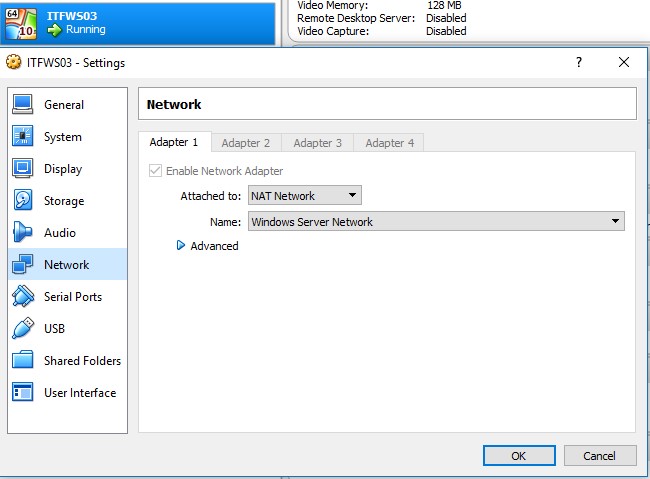
Make sure your VM in virtual box, settings, network, attached to: is set to NAT network You can use the static IP address of 192.168.0.50 or whatever you want, just as long as none of your other computers are using that IP address. It should work, you need to be able to ping the Domain Controller.
If that does not work, go to a DOS prompt on the Windows 10 computer, type ipconfig /all, take a screenshot of that and send it to me.
Thanks,
Robert
Settings in Virtual Box
NAT network will allow you to communicate internally from server to computer, server to server. It will also allow you to have an internet connection as well.
AKM wrote
Thank you very much. I already fixed that issue. I was not adding my win 10 VM to the NAT network.
Special thanks to AKM for asking this question on the message board. We are glad he was able to figure out his problem as well.
**Virtual Box has no selection for Windows 2016 **
Rajib had a question for the Message Boa…
No comments yet. Add the first comment to start the discussion.