
Client Discovery Methods
In this lecture, we are going to set up our Configuration Manager discovery methods so SCCM will be able to locate our domains forest, groups, system, and users. This lecture will be completed from our SCCM server.
Once you are logged into your SCCM server, open the SCCM console and navigate to Administration > Hierarchy Configuration > Discovery Methods. Here we can see there are several discovery methods available:
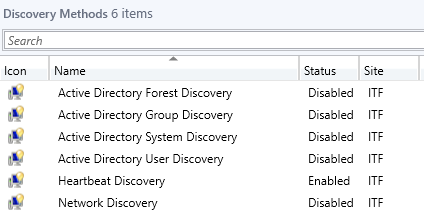
- Active Directory Forest Discovery
The forest discovery can discover sites and subnets within specified forests and create configuration manager boundaries for each.
- Active Directory Group Discovery
The group discovery will allow the configuration manager to find local, global, and universal security groups and their members. Distribution groups are not discovered as group resources.
- Active Directory System Discovery
This discovery method will discover computers from specified locations in Active Directory Domain Services.
- Active Directory User Discovery
This method discovers user accounts from the specified locations in Active Directory Domain Services.
- Heartbeat Discovery
This is used by active Configuration Manager clients to update their discovery records in the database. This can also force the discovery of a computer as a new resource record or it can repopulate the database record of a computer that was deleted from the database.
- Network Discovery
This discovery method searched your network infrastructure for network devices that have an IP address. It can discover devices that might not be found by other discovery methods including printers, routers, and bridges.
Right-click on Active Directory Forest Discovery and select Properties. First, you need to enable AD forest discovery. Next, we want to automatically create site IP subnet boundaries so check…
No comments yet. Add the first comment to start the discussion.