
What are PowerShell Providers
In this lecture, we are going to be taking a look at PowerShell Providers.
So what are Providers?
Providers are a method to access data so that you can view this data in a hierarchical (Hi -er-R-Key-Kool) structure. For example, if you open Windows Explorer, you view this data as a file system located in drives, directories, and subdirectories. So, providers, are designed to take various kinds of data storage and make it look like a disk drive. Providers have cmdlets that the user can run to manage these data stores. All the cmdlets used with Powershell Providers are listed and defined in this section.
Let’s go ahead and open, PowerShell ISE. From the Windows search box type Powershell , now right-click on Powershell ISE and click run-as Administrator. From the view, click show the script pane.
To view Built-in PowerShell Providers, type Get-PsProvider
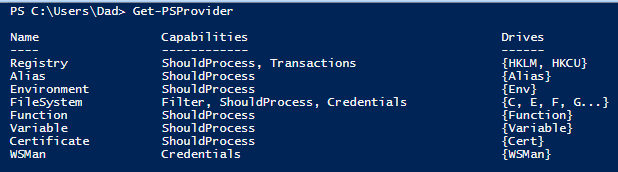
The above list not only shows the built-in providers but the drives that each provider currently supports.
A **drive **is an entity that a provider uses to represent a data store through which data is made available to the PowerShell session. For example, the Registry provider creates a PowerShell drive for the HKEY_Current_User registry hive.
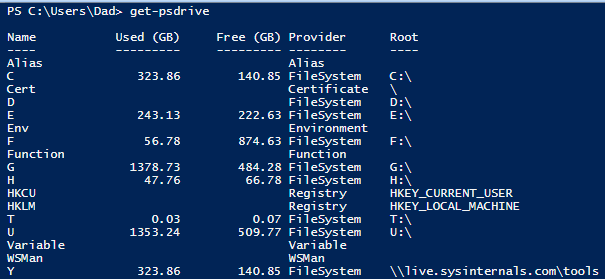
Now let’s take a look at all our drives. Type **get-psdrive – **This cmdlet is used to view all the PowerShell drives
Updating your help system
By now you are familiar with the PowerShell Help System. In this section, We’ll be using it to display syntax and to get the latest examples for all the provider…
No comments yet. Add the first comment to start the discussion.