
Understanding Groups and Memberships
Understanding Groups and Memberships in Active Directory
Active Directory groups and memberships are one of those things you MUST understand in order to administer Active Directory.
At a high level, Active Directory groups are collections of AD Objects. A group’s members can contain users, computers, other groups and more.
Let’s get started!
Create Group in ADUC
To create a group in Active Directory right-click on your desired OU and select New > Group:
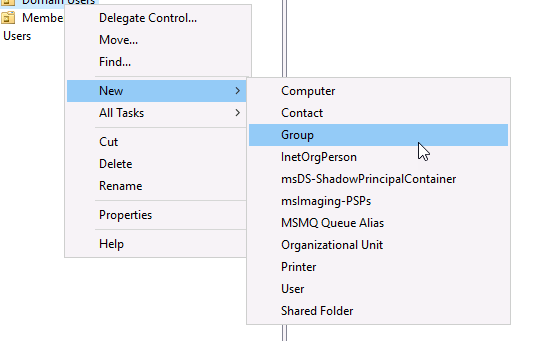
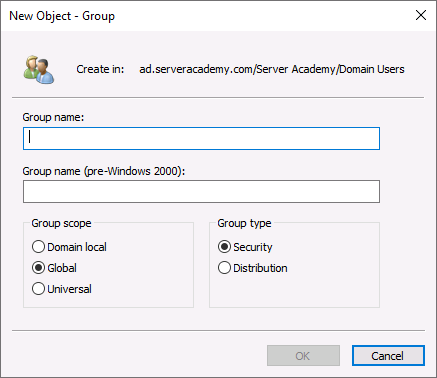
The New Object - Group window will appear.
Group Name
Now you need to specify the Group Name. This is the name that will be displayed for the group in Active Directory.
Group Name (pre-Windows 2000)
This will automatically populate the pre-windows 200 group name as well. As the name implies this name is compatible with older versions of Windows Server and is limited to 20 characters.
I am going to name my group “Test Group”
Group Type
There are two types of groups in Active Directory:
- Security
- Distribution
Security
A security group in Active Directory is used to assign permissions to resources with Group Policy.
Distribution
A distribution group in Active Directory is used to create email distribution lists.
We are going to use a Security group in this lesson.
Group Scope
For the group scope, we have three options:
- Domain Local
- Global
- Universal
The scope generally only comes into play when you dealing with multiple domains and trusts. If you are in a single domain environment, nine times out of ten you are going to be fine picking a Global scope. We will still cover the differences here however.
The difference between these comes down to the possible members, memberships…
Edited on Oct 1, 2026 at 1:13 AM
Hello Paul. Your videos have been excellent so far. I appreciate what you do. I have one critique on this particular video: you are flying through information very fast. I'm working to keep up with the vocabulary terms you are using, but your pace and transitions between words and concepts are very notable here. I want to say that I'm brand new to this, and some of these terms and concepts are my first time hearing and piecing together. Perhaps a more methodical pace would be reassuring if you thought so as well. Thanks.
Thanks for the feedback. I will see if I can find more ways to help new people not feel overwhelmed with all the information.