
Creating, managing and deleting OUs
In this lecture, you’re going to learn how to create, manage, and delete Organizational Units within Active Directory.
Open Active Directory Users and Computers by selecting from Server Manager > Tools Active Directory Users and Computers.
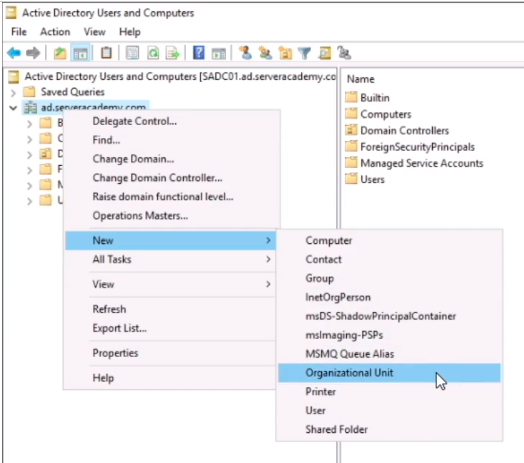
Let’s create a new OU. Right-click on ad.serveracademy.com and select from the context menu New > Organizational Unit.
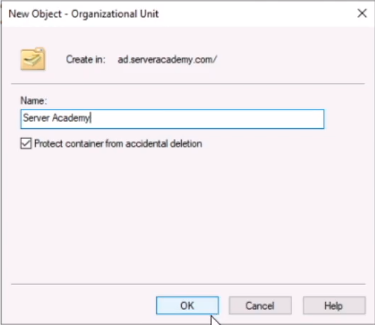
Let’s name the OU Server Academy.
Note that we have a checkbox checked to Protect the container from accidental deletion. We definitely want to leave it checked, since if we don’t, and somebody accidentally deletes it, will wipe out our entire infrastructure of users we are about to create under this OU.
Click OK.
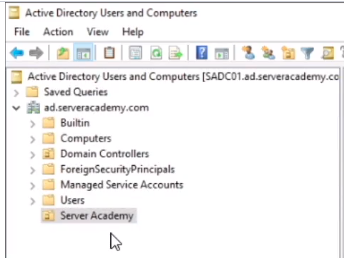
We see now the OU has been created.
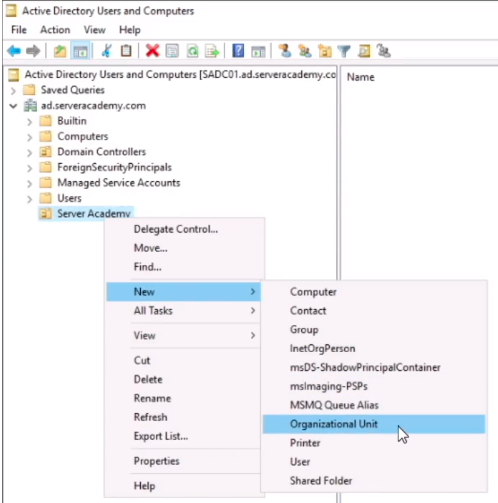
Now, right-click on the OU and choose New > Organizational Unit.
This is kind of my go-to when creating a new domain, I create a new set of OUs.
Name the OU Member Servers. This OU will be for my other Windows Server operating systems computers that are not Domain Controllers. Click OK.
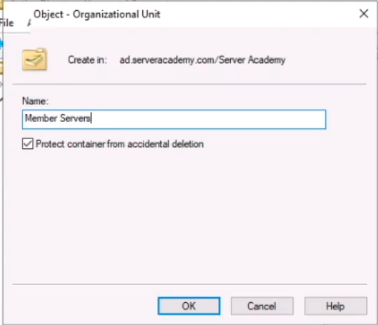
Let’s create some more OUs repeating the steps and name them as follows:
- Member Servers
- Gaming Servers
- DCS
- Arma 3
- Gaming Servers
- Domain Users
- Domain Admins
The reason why we separate these out is because we can create Group Policy Objects and apply them to these OUs. That way, we can create a Firewall GPO and apply it to DCS for example, and another GPO for Arma 3 and so on.
If we right…
No comments yet. Add the first comment to start the discussion.