
Organizational Units (OUs) and Containers
In this lecture, I will be giving you an introduction to Active Directory Organizational Units and Containers.I am logged into my domain controller SADC01 and we are going to launch Active Directory Users and Computers by selecting from Server Manager > Tools Active Directory Users and Computers.
Once our console comes up we are going to see our domain name on the left pane: ad.serveracademy.com. Click to expand it to show the contents.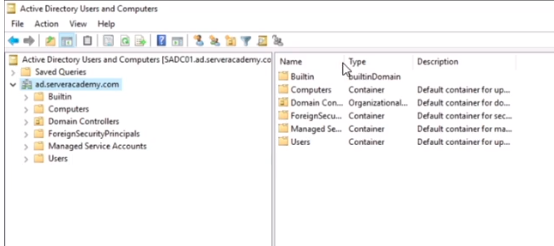
We will talk about the Containers or folders as you might call them. We will explain what they are, what they are used for so that you have a good understanding of what’s going on here.These folders are here by default and are of different types. We have one BuiltinDomain, an Organizational Unit, and some Container folders.
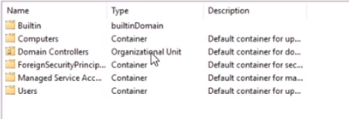
The Container folders are structural objects that are included by default within Active Directory. The most common difference between a Container and an Organizational Unit is that an Organizational Unit can receive Group Policies. You cannot apply Group Policies to Container objects and you cannot deploy them to the builtinDomain folder.**IMPORTANT: **Group Policy Objects do apply to containers, but they cannot be LINKED to containers.
The way in which you would apply the Group Policies configuration to this default folder is if you assign it to the domain ad.serveracademy.com. We will be mainly creating, editing, and deleting Organizational Units and not Containers, although it is possible to create Container objects.
We have different Containers:
Computers Container: This is the default location for new computers that join the domain.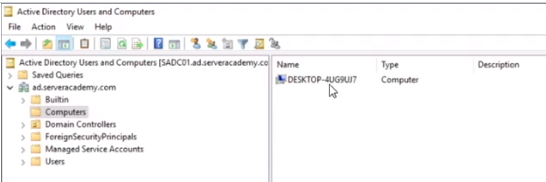
ForeingSecurityPrincipals Container: This…
No comments yet. Add the first comment to start the discussion.