
Promoting Our Second Domain Controller
In this lecture, we’ll be promoting our second domain controller to our domain.
Now, a second domain controller is built for redundancy purposes and for larger networks that you would like to do some type of load balancing or you want to have multiple domain controllers that your users and clients can use.
It can also be useful if you have two different sites, so if you configure Active Directory Sites and Services and you have a location in New York and another in Chicago you may want to promote a Domain Controller in Chicago and have all your users use the closest Domain Controller to their location.
At this point, you should have created your second VM with the Windows Server operating system and you should have configured the computer name and IP address.
Let’s dig into the IP configuration since this is very important.
Open your Ethernet Adapter properties.
NOTE: For the lab use the following network settings for your second domain controller if you are using our IT labs:
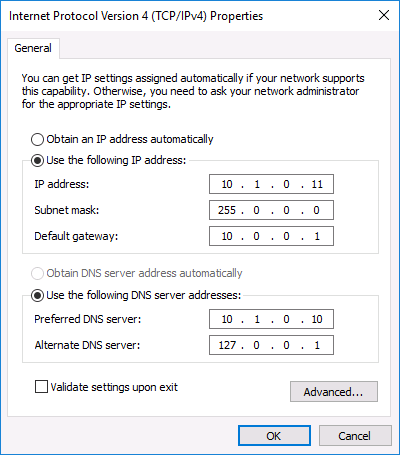
We are using an IP address ending in .11 since our primary Domain Controller has an IP ending in .10.
The preferred DNS server is the Primary Domain Controller’s IP Address and that is because it has the DNS Server role installed. That means that when we try to resolve serveracademy.com or ad.serveracademy.com it will resolve to the IP Address of the Primary Domain Controller.
If we do not do this we will not be able to resolve the domain name we are trying to join this server to.
To test we can open a Command Prompt and type nslookup ad.serveracademy.com. What this does is return the IP Address of my primary Domain Controller.
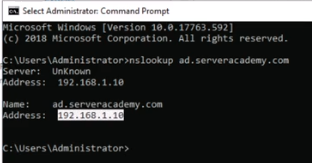
This is possible because we have configured the IP Address of the Primary Domain Controller as the preferred DNS server.…
No comments yet. Add the first comment to start the discussion.