
Monitoring and Debug Logging
**In this Video: **
- We will describe two troubleshooting tools from Windows DNS Manager called Monitoring and Debug Logging.
- We will test our DNS configuration using monitoring. Then we will perform three tests utilizing Debug Logging.
- At the completion of this lecture, you will gain valuable-work related knowledge and experience by utilizing and implementing the tools discussed in this lecture.
**Monitoring **
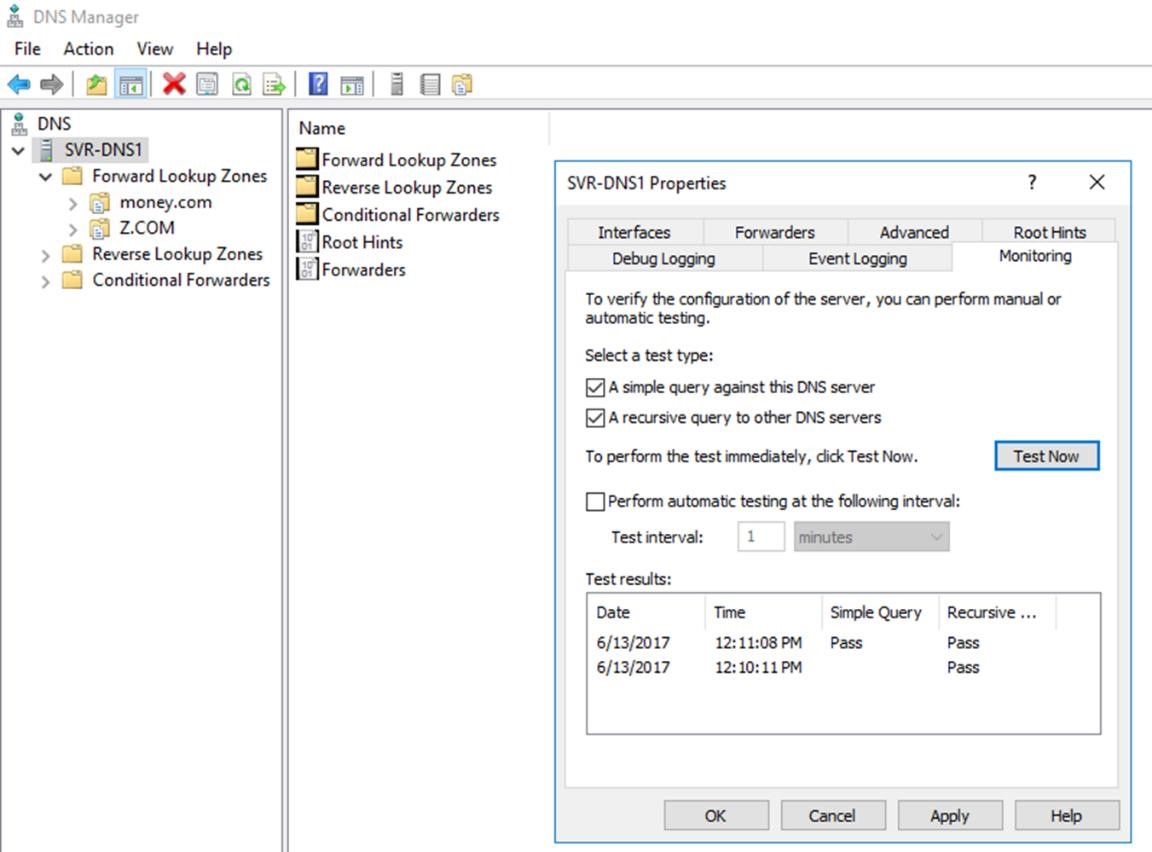
- From SVR-DNS1, open server manager, tools, DNS, right click on DNS server, properties, click monitoring.
- Select a test type
Check – A simple query against this DNS server – click test now
The DNS client that’s running on the DNS server will perform a simple query, to test if the DNS server can perform name resolution on itself. Similar to using nslookup. A simple query is a query that this DNS server resolves without contacting any other DNS server. A simple query does not require network access. Click test now, and the simple query passes the test.
Now check, A recursive query to other DNS servers – This test performs a DNS style lookup to the root. Requires network access. You can test both at the same time, and you can set the time interval. Click test now and the recursive query test passes.
**Debug Logging **
Purpose: What can I use debug logging for? For the purpose of this lecture we will conduct three tests.
- We will determine if our secondary partners are getting notified when there are changes that have been made to the data base.
- We will test if there are any servers or clients that are having trouble updating their DNS records.
- We will identify whether there are other computers performing queries on our DNS server.
**Prerequisites: **
- There are two servers I will be using for these tests. A member server (SVRDNS1) and a domain controller…
No comments yet. Add the first comment to start the discussion.