
Configuring Response Rate Limiting
If you recall Response Rate Limiting is a way to prevent amplification attacks on your DNS server.
In our example
- The Bot commander issues a command to many computers (bots)
- Commanding that the bots request several DNS servers to send back data but instead of sending back all that data to the source, the DNS servers are spoofed into sending all the DNS zone data to the target DNS server instead.
- This target server is soon overloaded and what you end up with is a Denial of service or DDOS attack.
That is why we need to configure Response Rate Limiting on our DNS server.
Here are the two RLL commands that we will be using.
- get-DnsServerRRL – Displays the default RRL values
- set-DnsServerRRL – Configures Response Rate Limiting
Open Powershell and type:
- Get-DnsServerRRL and press return
Displayed are the default RLL values. You can change these values with the setDnsServerRRL command.
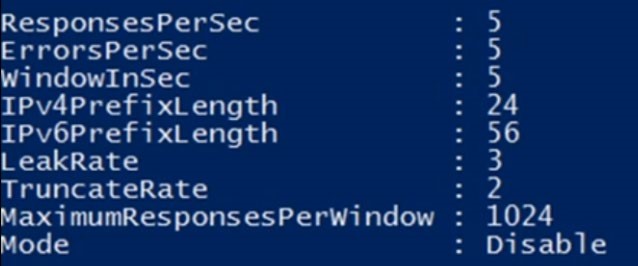
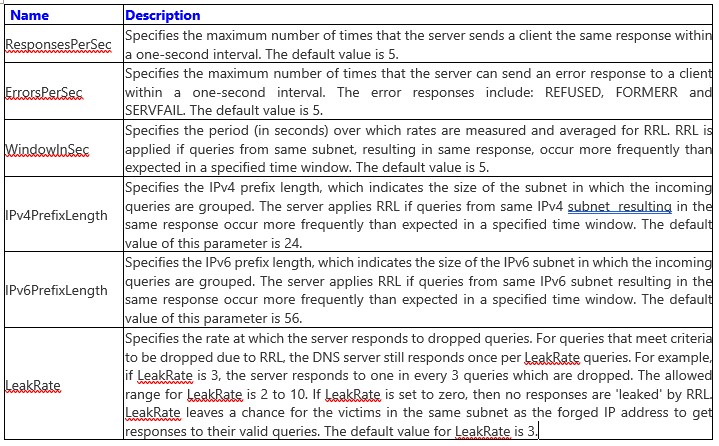
I’ve provided a chart as part of the documentation that describes all the parameters in detail associated with the command Set-DnsServerRRL.
- Parameters add additional functionality to the basic command.
At the bottom of the chart notice the mode command
Read the description from the video. Here is the short version from the description
- Mode – Set to enable or disable or logOnly. By default set to disabled
- If you set LogOnly – This would tell you what RRL would have done if it had been enabled during an attack. You can set this to LogOnly to see if there is any negative impact by running RRL from your clients.
The Chart (slide 5) below explains each parameter in detail (Sl6)
 ![](https://zrftqtvkikjkbtkfalgp.supabase.co/storage/v1/object/public/lesson-images/1713d3e…
No comments yet. Add the first comment to start the discussion.