
Python 3 Syntax
This lesson has Python 3 Trinkets which are executable scripts in the web browser. Click the play button as shown below to execute the python code:
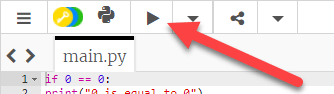 Python 3 Trinket
Comments
Commenting your code is extremely important and that is why we are starting comments! A comment is preceded with a hash # symbol:
# This is a python single line comment
You can write comments on their own line or directly after a command:
print("Hello Server Academy!") # This is a comment after a command
You can also create multiline comments using triple quotes:
When you're writing code you MUST use comments to explain what your code is doing so you (in a later time) and other developers will know what the code you write is doing.
Indentation
Python relies on indentation (the white space before a series of commands) to indicate blocks of code. See the below example of how Python cannot execute the code below:
To fix this code you need to add some indentations like that shown below. Try copying the code below into the editor above.
Note that it doesn't matter how many spaces you use, as long as you pick a number of spaces and stick with it. The standard is 4 spaces, so it's a good idea to use that.
To continue the if code block, we will use the same indentation until we are ready to complete the code block:
No comments yet. Add the first comment to start the discussion.