
Ansible Facts
In this lesson, you will learn about Ansible facts and how to use them in your playbooks. Ansible facts are data related to your nodes (or hosts) that Ansible gathers and makes available for use. This knowledge is crucial when you need to make decisions or perform operations based on specific node characteristics. You'll see how to view a node's facts and then use one of these facts - the hostname - in a playbook task to create a uniquely named file.
Viewing Node Facts
Before we modify a playbook, let's first understand how to view the facts of a node. Facts provide detailed information about the host, such as network interfaces, operating system, IP addresses, and more. This information can be incredibly valuable for dynamic playbook execution.
To view the facts of a node, you can use the setup module in Ansible. This module gathers facts about the hosts and can be run as an ad-hoc command. Here's how you can do it:
__
Note that you must be in your project directory where you inventory file is located. For most of the course we have used the ~/code directory of our user account. For me, it's /home/paulh/code
ansible managed-node-1 -m setup
This command will display a JSON output with all the facts collected from managed-node-1.
We can pipe this to the less command to search through this document rather than scrolling through the data:
ansible managed-node-1 -m setup | less
Next, press / and type in ansible_hostname before pressing enter. This will search the output for a matching string. In our case, it should show managed-node-1:
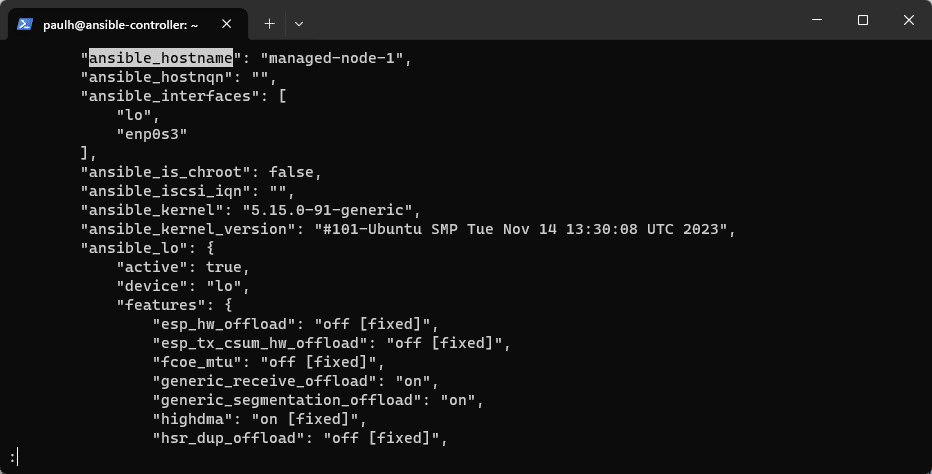 Searching Ansible Facts with the Less Utility
Let's use the fact ansible_hostname in our playbook. Press q to exit the Less utility and return to our bash prompt.
Modifying the Playbook to Use Hostname…
No comments yet. Add the first comment to start the discussion.